
Why player feedback is worth getting right
Players will tell you what they think, whether you ask or not. The question is whether you can find it, make sense of it, and act on it before it gets lost.
Feedback comes in everywhere at once: Discord messages, Steam reviews, Reddit threads, support tickets, replies to a patch announcement. On their own, none of these is built to hold feedback. Good ideas get buried, the same request comes in ten times, and players start to feel like no one is listening.
This guide covers the process end-to-end: collecting feedback, getting it into one place, managing the volume, and closing the loop so players know they were heard. The advice applies whether you're in early access or running a live game years past launch.
What shapes player feedback
While many feedback best practices apply to any product, games have a few unique characteristics that change how feedback arrives and how you need to manage it. Keeping these in mind before setting up your feedback process will help you avoid common pitfalls.
A patch changes the game for everyone at once
Games rarely roll out gradually. A patch usually lands for your entire player base at the same time, and the reaction lands the same way. A balance change can generate more feedback in a day than in the previous month. Your process needs to handle quiet stretches and floods, not just an average.
Balance complaints are their own category
A single post might report a bug, ask for a feature, and complain that a weapon is overpowered, all at once. Balance and fairness complaints exist because players are competing with or against each other inside a shared system. Players don't sort this into neat categories, and the work of separating it falls to you.
Communities turn toxic fast
Player communities are passionate and organized, which is what makes their feedback valuable. That same passion turns into pile-ons over an unpopular change, brigading, and personal attacks on your team. A feedback channel you can't moderate will eventually cost you more than it gives.
Where your players already give feedback
Before you decide where you want feedback to go, it helps to know where it already lives.
Solicited vs. unsolicited feedback
Solicited feedback is what you ask for: posts on a feedback board, survey responses, and replies to a question you posted. It's structured and easy to act on because you set the terms.
Unsolicited feedback is everything players say without being prompted: Steam reviews, Reddit threads, clips, and comments under a patch note. There's more of it, it's more honest, and it's harder to track. You won't capture all of it, but it's worth monitoring, because it often surfaces problems before they reach your board.
You need both. Solicited feedback gives you a clean, prioritized list to work from. Unsolicited feedback tells you what players actually think when they're not filling out a form.
Discord, Steam, and Reddit: good for energy, bad for tracking
These are where your community spends its time, and that makes them valuable for conversation. The problem is that none of them is built to store feedback. A great suggestion in Discord scrolls out of view in an hour. Steam reviews can't be sorted into a roadmap. Reddit threads get locked and forgotten.
Use these channels to talk to players and notice what they care about. Just don't rely on them as your record of what's been requested. That belongs somewhere you can search, sort, and update.
A note on playtest and beta feedback
Feedback during a playtest or closed beta works differently. You're often after a specific answer ("is this boss too hard?"), and watching how players behave tells you more than asking them does. Players say a level was fine and then quit halfway through it.
For these phases, structured sessions and behavioral data matter more than a public board. A board still helps for collecting bugs and suggestions, but treat playtest feedback as its own task with its own goals.
Ask for feedback (and keep asking)
Opening a Discord and waiting isn't enough on its own. Most players won't volunteer feedback unless you ask them to, clearly and more than once.
Ask clearly and often
Tell players exactly where to go and what you want. A line in your patch notes, a prompt on the main menu, or a pinned post should each point to one place and make the request plain. "Got a suggestion? Post it here" works better than a vague invitation to share thoughts.
Asking once isn't enough. Players don't always have feedback the first time they play; it takes a few sessions before they hit the boss that's too hard or the menu that's confusing. Keep the ask visible so it's there when they're ready.
Ask at the right moment
The best time to ask is when a player feels something, good or bad. That's when they have something to say. A prompt after finishing a level, on the quit screen, or right after a big moment will get more response than a generic request buried in a menu.
Time it for a break in the action. A prompt that interrupts a fight does more harm than the feedback is worth.
Personal asks work better than broadcasts
A direct, personal request gets far more response than an automated one. This matters most early on, when you're trying to get the first feedback in. Ask players individually, by name, from a real person rather than a no-reply address, if you can. It doesn't scale forever, but it gets the loop started.
Make it easy to submit
Every barrier between a player and the submit button costs you feedback. The easier you make it, the more you get.
Set up a board that players will use
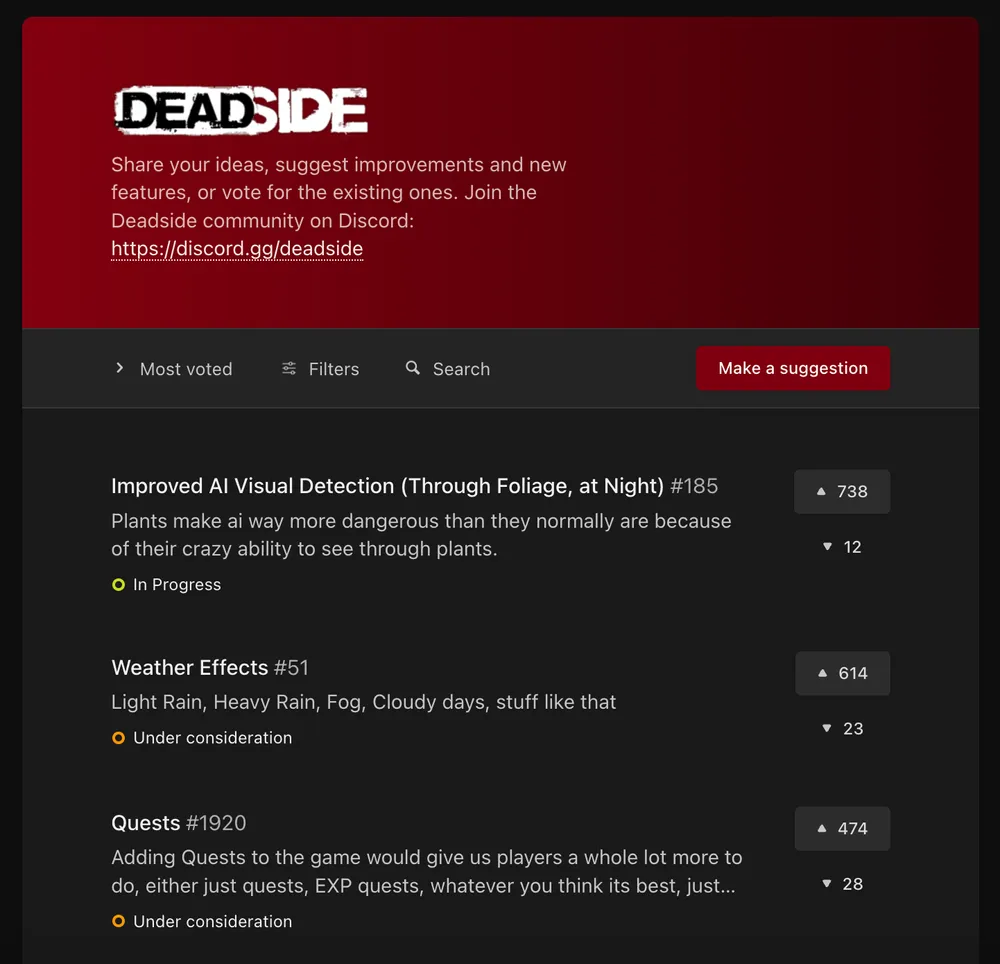
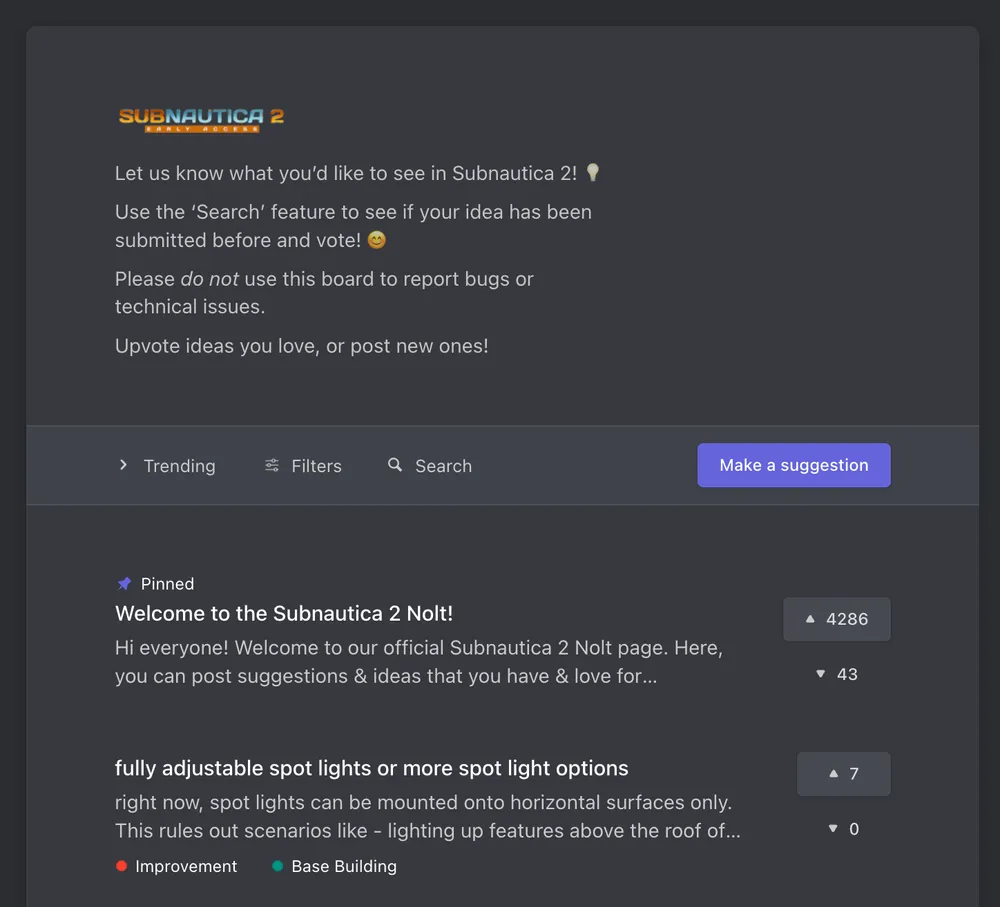
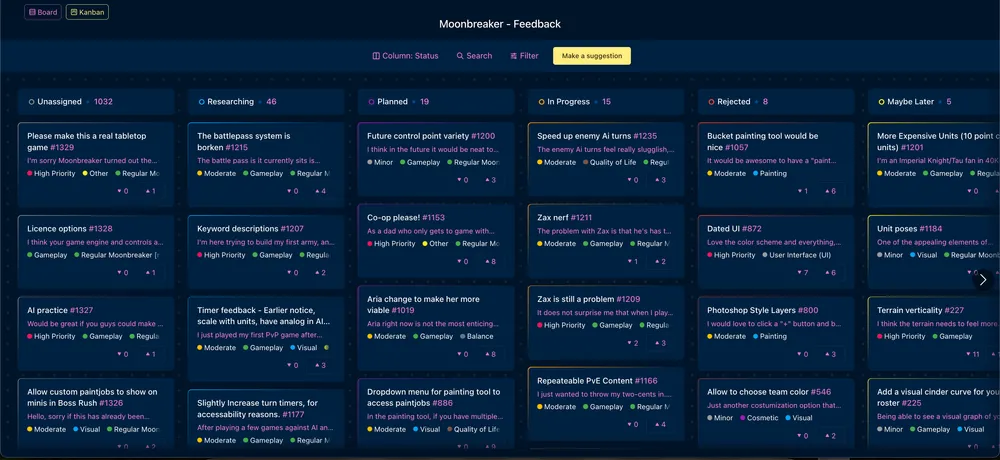
A feedback board gives players one place to post, vote on, and discuss suggestions, and gives you one place to manage them. Players can see what's already been requested, upvote it instead of posting a duplicate, and watch its status change as you work on it.
Pick a board that's quick for players to use and quick for you to set up, so feedback starts flowing within minutes. Moonbreaker, Deadside, Volcanoids, Subnautica 2, Rust, and M.A.S.S. Builder all run public Nolt boards you can look at to see how a live game sets one up.
Keep the ideas board simple and the bug board structured
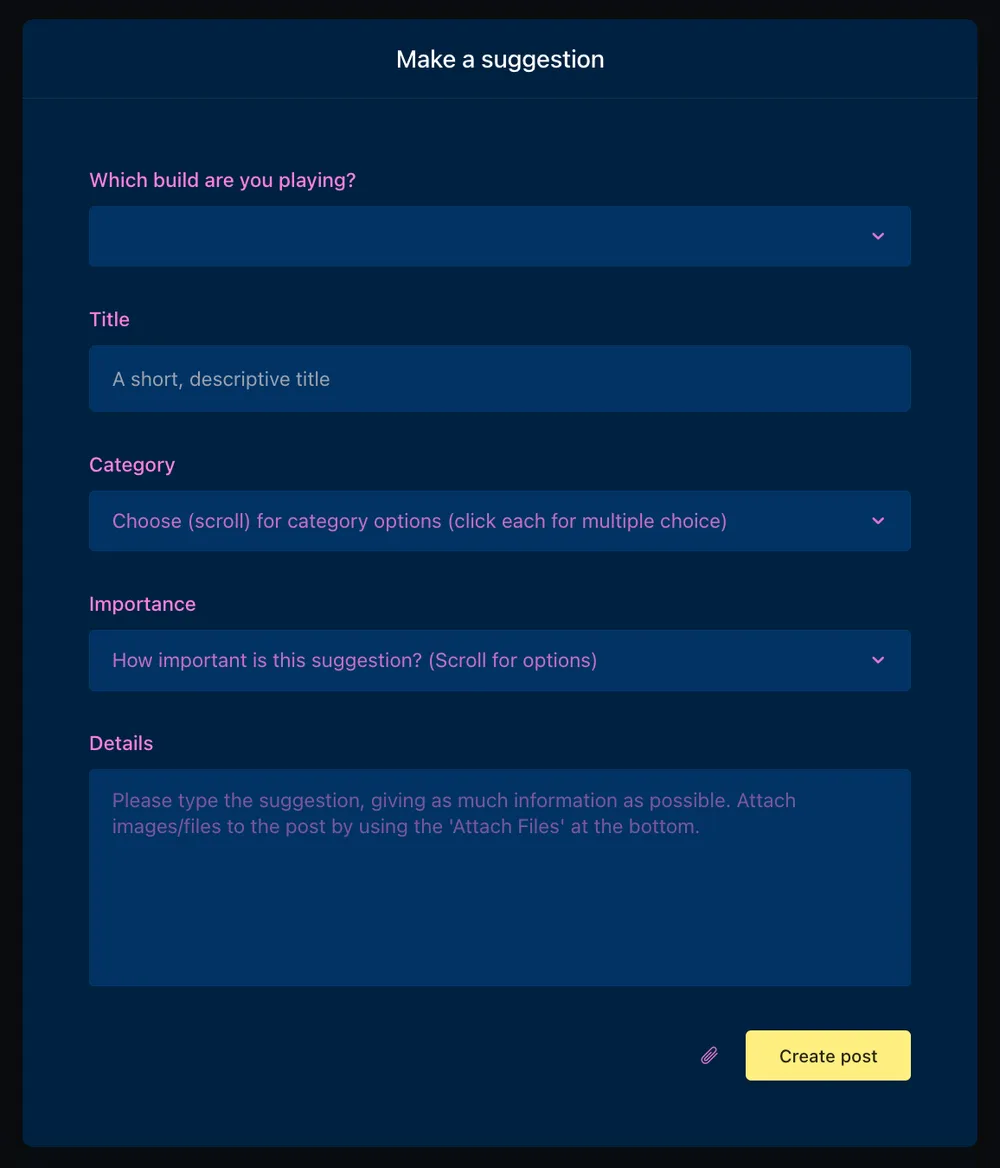
There's a tradeoff between easy and useful. The more fields you require, the fewer submissions you get. A bug report with no version number or platform, though, is hard to act on.
The fix is to treat the two differently. Keep your feature and idea board nearly frictionless: a title, an optional description, maybe a category. Suggesting something should take a few seconds, nothing more.
For bug reports, a few required fields are worth the friction. Platform, build number, and steps to reproduce turn a vague complaint into something your team can fix. Players reporting a bug are more motivated, so they'll tolerate the extra step.
Skip the login wall
The biggest drop in submissions comes from forcing players to create an account before they can post. There are two ways to avoid it.
Anonymous submissions let players post and vote without revealing their identity. This lifts participation and tends to surface more honest feedback, since players aren't worried about how a complaint looks attached to their name. With Nolt you can decide per board whether to allow this.
Single sign-on is the other option. It lets players use the game account they already have instead of signing up for anything new, so there's no extra login between them and the submit button, and you still know who's contributing. If you'd rather not embed it elsewhere, Nolt's website widget drops the board straight into your site or launcher, so players never leave to give feedback.
Beyond the board itself, let players give feedback in whatever channel they're already in, and take on the job of routing it into one place yourself.
Route feedback to one place
Feedback that arrives in five channels lives in none of them. Pick one place to hold it, and make everything else point there.
Link to your board where players already are
Your board only works if players can find it. Put a link everywhere they already look: the main menu, the pause or help menu, your Steam page, your website footer, patch notes, and your Discord. Each of these takes a minute to set up and keeps working without you.
If your board is empty at first, post a few ideas yourself. Players are much more likely to contribute to a board that already has something on it than to a blank page.
What to do about Discord
The case against relying on it is real. Most of your players aren't in your Discord, and the ones who are skew toward your most engaged, hardcore players. If Discord is where you gather feedback, you're hearing from a narrow slice of your audience and mistaking it for everyone. On top of that, messages scroll away, the same request comes up weekly with no memory of the last time, and nothing can be sorted or tracked.
Moving off Discord entirely isn't realistic either. It's where your community already is, and the conversation happening there is worth having.
The fix is to let Discord handle the conversation and let your board hold the record. Discuss ideas there, then move anything worth tracking onto your board. Nolt's Discord integration handles the bridge: new posts and status changes show up in your server automatically, and nothing needs to be copied across by hand. The conversation stays where your community lives; the record lives somewhere you can actually manage it.
Pinned posts, in-game links, and patch notes
A few placements do most of the work.
A pinned post in your Discord's feedback or suggestions channel gives the board a permanent home in front of your most active players. An in-game link, placed in the main menu, pause menu, or options screen, reaches players who wouldn't join the Discord channel.
Patch notes are the best-timed placement of the three. When you ship an update, players already have opinions about it. Ending your notes with a link to the board catches them at the moment they have something to say, and it pairs naturally with flagging which items in that patch came from the board.
Manage the flood
Once feedback flows in, the work shifts from collecting to sorting. This is where boards either stay useful or turn into a dump.
Merge duplicates
Ten players will report the same problem ten different ways. Left alone, that's ten posts each with four votes, and nothing looks important.
Merge them. One post with forty votes tells you what to do next. Nolt's merge tool combines ideas and keeps the votes, so the signal adds up. Merge as posts come in, while the board is still small enough to keep up with.
Tag and categorize
Without categories, a board with hundreds of posts is unsearchable. Tag by what you need to filter on later: area of the game, platform, or type of request.
Custom fields let players self-select the category when they post, which saves you the sorting and helps them find existing posts before creating a new one. Set these per board.
Let the votes set priority
Votes are the cheapest prioritization signal you have. Players tell you what matters most without you running a survey, and the ranking updates itself.
Treat votes as one input among several. A request can top the board and still be wrong for the game. But if something has been sitting at the top for months, you owe your players an answer either way.
Segment users to weight feedback that matters
Raw vote counts treat every player the same. Often, they shouldn't be.
Fifty votes from players who've never spent anything and twenty from your highest-spending segment are different signals, and you may want to weigh them differently. Same for platform, playtime, or region: a request that's huge on console and invisible on PC disappears into a single number.
Segmentation lets you filter feedback by any attribute you track: revenue, tier, playtime, whatever matters for your game. Votes tell you how many players want something. Segments tell you which ones.
Keep your board healthy
A public board attached to a game community needs moderation. Nolt gives you several layers, and you can run as few or as many as your community size calls for.
Start with the automatic moderation
Every board has bot protection enabled by default, which blocks known spam bots before they reach you. It handles automated traffic, and human bad actors need the tools below.
The profanity filter catches routine cases and works two ways. Grawlix censors the flagged words and keeps the post visible, which suits a community where salty language is normal but slurs aren't. Reject blocks the submission outright and shows the player a message you write. The blocklist is customizable per board, so you can add terms specific to your game or community.
AI moderation is the layer that scales. It scores every post and comment for risk from 0 to 100 and acts on your thresholds: auto-reject above 85, hold for review above 70, flag for a moderator's attention above 40. Every threshold is adjustable, and each category can be switched off. For a community that generates more content than your team can read, this is what keeps the board clean while you sleep.
Decide what gets reviewed, and when
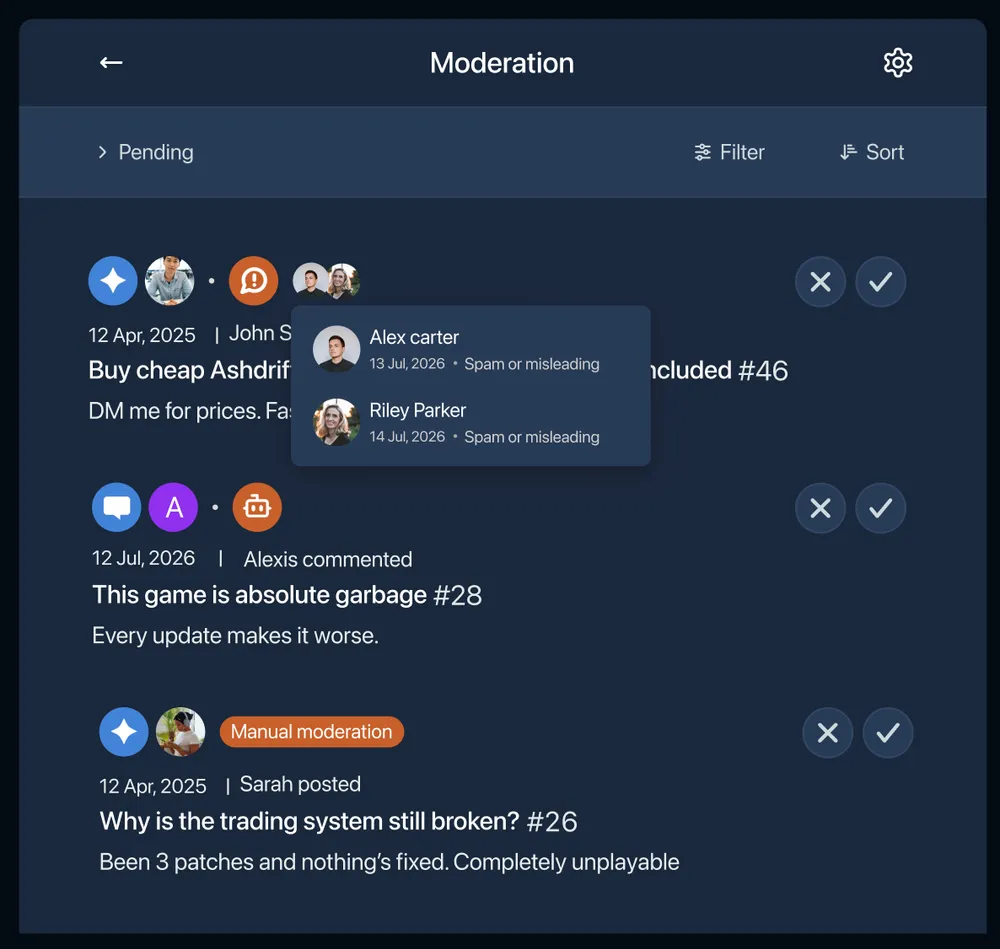
Manual moderation sends every post and comment to a queue and holds it until a moderator approves it. It gives you full control, and it costs you: someone reviews everything, and real-time discussion slows to the speed of your queue. It suits teams that need strict control over what appears.
Running manual and AI moderation together is the middle ground. Manual approval still gates everything, and AI stops auto-rejecting. Instead, it flags high-risk items inside the queue so moderators know what to read first. If the AI layer fails, everything gets flagged, so nothing slips through unreviewed.
Content reporting brings your community in. Players report posts and comments, reported content stays visible until a moderator acts, and the reports land in the same workflow. For a large player base, this is the cheapest moderation capacity you have.
Ban bad actors and lock heated threads
A small number of accounts create most of the work. Banning one removes them and lets you delete their posts, comments, and votes in a single action.
Bans on Nolt are silent. Banned players get no notification, and they can keep posting and commenting, but none of it is visible to anyone else. For a game community, this matters: a visible ban becomes a Reddit thread and a new alt account, while a shadow ban ends quietly.
Locking is the lighter tool. When a thread stops being constructive but the request itself is worth keeping, lock the conversation and leave the post standing. Locks can be temporary, which is often enough for a thread to cool down.
Moderators, admins, and owners can also delete individual posts and comments at any time.
Handle brigading over controversial changes
Some changes bring an organized wave: a nerf, a monetization update, a delay. Votes and comments arrive faster than you can read them, and much of it repeats.
Two things help. Merge the wave into one post so the discussion has a single home and the vote count reflects the real scale. Then respond there, once, with a real answer. Silence extends a brigade longer than an unpopular decision does.
The feedback underneath is usually legitimate even when the delivery isn't. Read past the volume for what players are objecting to, and let the moderation layers handle the rest.
Close the loop
Collecting feedback creates an obligation. Players who post and hear nothing back stop posting, and the board goes quiet. Closing the loop is what keeps it alive.
Use statuses to show progress
A status turns a suggestion into a visible decision. Planned, in progress, done, and not planned each tell a player where their idea stands without you writing a reply.
Statuses are customizable, so match them to how your team actually works. A studio shipping seasonal updates might use "next patch" and "considering for season 3" instead of generic labels.
"Not planned" is worth using freely. Players accept a clear no, far better than months of silence, and it keeps your board honest about what's coming.
Choose who hears about what
Status changes, comments, and merges each generate a notification, and you control which groups receive them. Nolt splits the people attached to a post into four: the original poster, commenters, upvoters, and subscribers.
The defaults suit most boards. Status changes notify all four, since anyone who upvoted a request wants to know when it ships. Comments notify the original poster, commenters, and subscribers, keeping upvoters out of routine discussion.
Merges have their own settings, which matters given how often you'll merge. By default, everyone on the source post is notified when it's folded into another, so the ten players who reported the same bug all get pointed at the post now tracking it. Followers of the target post stay quiet, so a heavily merged request avoids spamming its supporters every time you tidy up.
Title change comments stay off by default, which keeps small edits out of inboxes. Players can also opt out of these emails.
Keep a roadmap that players can see
A public roadmap answers the question players ask most: what are you working on? It also cuts repeat requests, because the answer is already on the page.
Your roadmap builds itself from the statuses you're already setting, so the overhead is close to zero. Keep it current. A roadmap showing work you finished two patches ago does more damage than an empty one.
Publish a changelog when work ships
The roadmap shows what's coming. The changelog shows what landed, and it sits alongside your board and roadmap by default.
Nolt can draft entries for you. Point it at your completed feedback posts, choose a date range, and select which posts to include, and it generates the entry. Point it at a GitHub repository and branch instead, and it drafts from your commits. Either way, the result arrives as a draft for review before publishing, and you can supply style examples so entries read in your studio's voice rather than generic release-note prose.
Entries publish immediately, save as drafts, or schedule for a set time, which fits a patch going live at a fixed hour. Reminders tell you when enough completed posts or commits have accumulated to be worth writing up.
The changelog widget embeds the whole thing in your game or launcher so players see updates without going looking.
A repeatable feedback workflow
Everything above works only if it happens regularly. The studios that get value from a board treat it as a standing routine.
A per-patch cadence
Tie the feedback work to the rhythm you already have. Most studios ship on some cycle, and the patch is a natural anchor.
Before the patch. Review the top requests, decide what's going in, and set statuses so players can see the shape of it. Anything you commit to building moves into your dev tracker. Nolt's Jira and Trello integrations link a post to its ticket, so the board reflects progress as the work moves.
During the patch. Use internal notes to keep team discussion on the post itself, hidden from players. Context about why something is hard, or which system it touches, stays attached to the request, where the next person will find it.
After the patch. Publish the changelog, credit the players who suggested each item, and set the shipped posts to done. That last step fires the notifications that bring people back to the board.
Then expect the spike. The days after a patch produce the most feedback you'll see all cycle, which is when merging and moderation earn their keep.
The weekly checklist
Between patches, a short weekly pass keeps the board current:
- Merge duplicates that came in
- Tag and categorize new posts
- Clear the moderation queue
- Read the top five requests by votes, and check them against your segments
- Reply to anything sitting without an answer
- Update statuses that have changed since last week
Nolt's weekly report summarizes board activity, which makes a useful trigger for this pass. Twenty minutes a week is usually enough. The work stays small as long as it stays regular.
Feedback management comes down to doing a few small things consistently: route it to one place, keep it clean, and tell players what happened.
If you already run a board, most of what's covered here sits in your board settings under moderation, notifications, and changelog. If you're starting from scratch, new boards come with a 10-day free trial of the Pro plan and no credit card. Create a board, and you can have it live before your next patch.